

- You need to be on a team’s roster. Your club puts you on a team after you register.
- Answers close when your team’s lineup locks. Your league sets when that is.
Answer in the app
1
Open Home
Sign in. On a phone, tap Home in the bar at the bottom.
2
Find Can you play?
It’s at the foot of your Next match card. New captain? That card is called Your first match as captain.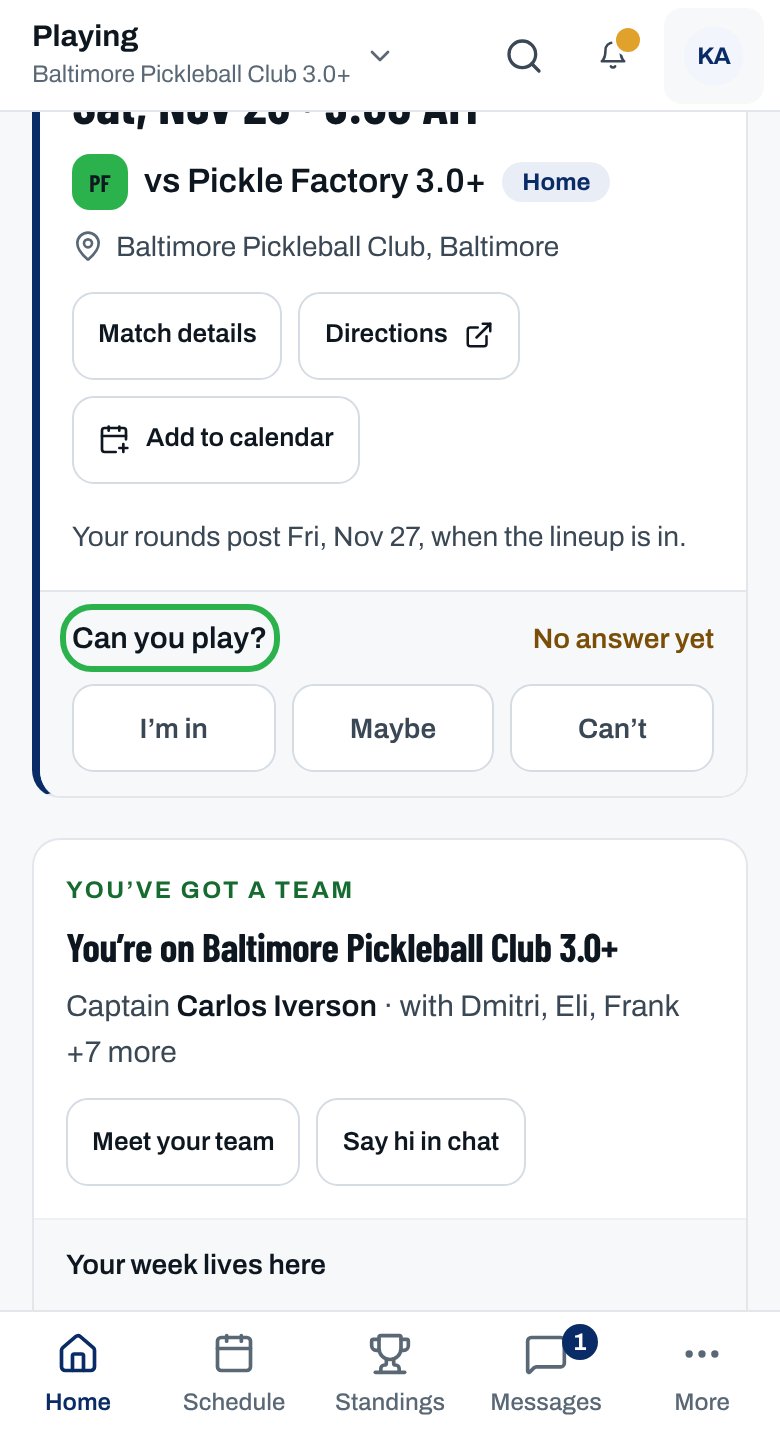
3
Tap your answer
Tap I’m in, Maybe or Can’t. There’s no save button.
The card shows your answer in words, such as You’re in or You can’t make it.
More ways to answer
Answer for several matches at once
Answer for several matches at once
- On Home, under Coming up, tap I’m in for all three (or both, or all and the number).
- Just placed on a team? The You’re on card on Home asks about the matches after your next one. While it does, Coming up doesn’t.
- Or open Availability & calendar under You in the sidebar (on a phone, tap More).
- On Schedule, with Your team selected, tap In, Maybe or Can’t on each match.
Answer from the match or team page
Answer from the match or team page
The match page has the same buttons at the foot of the You card. Your team’s page has them on its Next match card.
Answer from the email
Answer from the email
Tap I’m available or Can’t make it in the Can you play? email. You don’t need to sign in. See Answer from the email.
Change your answer
Change your answer
- Tap a different answer any time before the lineup locks. The newest one counts.
- Your captain isn’t told about the change. If the lineup’s already posted, tell them yourself.
Reminders
Reminders
- No answer yet? We email a reminder, and your captain can send a nudge.
- Your league sets how far ahead they go out.
- Turn them off or on under My matches in Notification settings.
Why isn’t this working?
There's no Can you play? on Home
There's no Can you play? on Home
You’re not on a roster yet, or your team has no match scheduled. Your club places you after registration closes. Still missing once the season starts? Ask your club’s admins.
“You’re registered for …” and no matches to answer
“You’re registered for …” and no matches to answer
Your club hasn’t put you on a team yet, or the schedule isn’t out. Says your spot is held until it’s paid? Tap Finish paying.
“Your team’s lineup for this match has locked, so your answer can’t change now.”
“Your team’s lineup for this match has locked, so your answer can’t change now.”
Your earlier answer stands. If your plans have changed, tell your captain directly.
“This match has already started, so answers are closed.”
“This match has already started, so answers are closed.”
The match is under way or finished. Tell your captain if something’s changed.
“This match was canceled, so there’s nothing to answer.”
“This match was canceled, so there’s nothing to answer.”
Nothing to do. Check Schedule for your next match.
“This match isn’t taking answers any more”
“This match isn’t taking answers any more”
It was canceled or moved, or you’re off that roster. Reload the page. A match is missing? Ask your club’s admins.
“Your session ended — sign in again and retry.”
“Your session ended — sign in again and retry.”
Sign in again, then tap your answer again.
Related articles
Answer from the email
One tap, no sign-in.
Your next match and rounds
When, where, and which rounds you’re playing.
Add matches to your calendar
Subscribe once and every match updates itself.
Rosters and lineups
When lineups lock, in your league’s rulebook.