

- You don’t need to sign in to see the standings. The Your team card shows only when you’re signed in and on a team in that division.
- Only confirmed results count. A match joins the table once both captains agree the score.
Check your team’s place
1
Open Standings
Tap Standings in the bar at the bottom. Captains: it’s under More, or on your team card on Home.
2
Pick a division
You start on your own. Tap another division’s name to switch.
3
Read Your team
It shows your place, like “4th of 8”, your Matches record and the playoff line.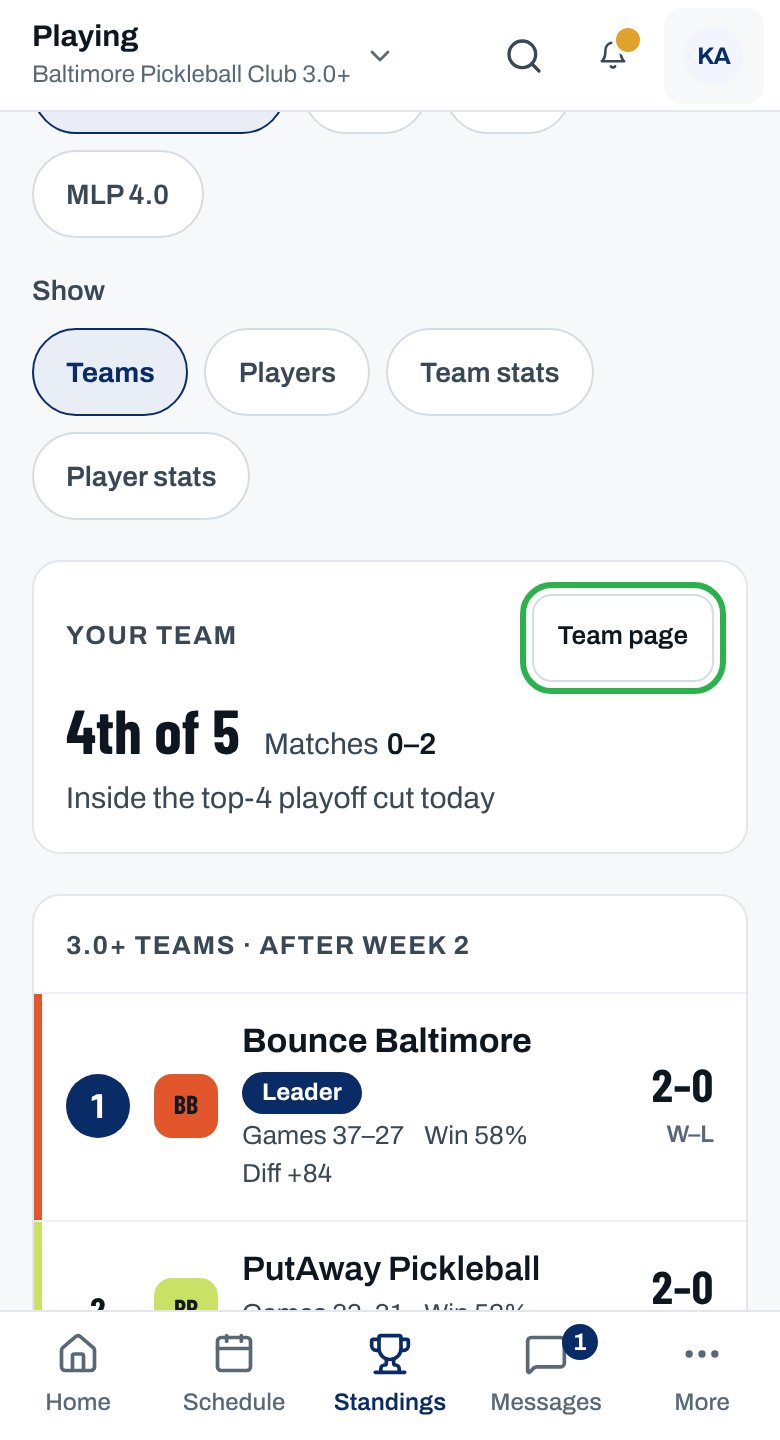
4
Find the playoff cut
The dashed Playoff cut line in the table: teams above it would qualify if the season ended today.
5
See more numbers
Tap Team stats for results by pairing, PPG and Clutch. Tap a column heading to sort.
You can see your team’s place and how far it is from the playoff cut. Your row in the table is marked Your team.
Reading the table
What the columns mean
What the columns mean
- Matches W–L: matches won and lost, then drawn if there are any.
- Games W–L: games won and lost across every round on every court.
- Game win % and Point diff: points scored minus points conceded.
- League points comes first if your league ranks teams by points.
How teams are ordered and ties broken
How teams are ordered and ties broken
Your league sets it each season. The note under the table spells it out, starting “Teams are ordered by …”. A tie that survives every tiebreak is settled by the league office.
Results marked Under review
Results marked Under review
A result disputed after it was confirmed still counts, and is listed above the table under Under review until the league office rules.
Which matches count toward DUPR
Which matches count toward DUPR
In DUPR seasons, the note under the table says. DUPR next to a team means it opted in; a match counts only when both teams did. See Scores and standings (Rally to 15 · Rally to 21 · Side-out to 11).
Why isn’t this working?
Our last match isn't in the standings
Our last match isn't in the standings
Its score isn’t confirmed yet. Ask your captain to check it’s entered and confirmed. Some leagues confirm it automatically once the time to confirm runs out.
I see “The field” instead of a table
I see “The field” instead of a table
No results are confirmed in that division yet, so it lists each team instead. The table fills in after week 1. Tap See the schedule to see when teams play.
“… isn’t running this season.”
“… isn’t running this season.”
That division was canceled. Pick another division.
I don't see Your team or the playoff cut
I don't see Your team or the playoff cut
Sign in and tap your own division. The cut line shows once a team has played, and only when some teams would miss out.
Two teams have the same record but different places
Two teams have the same record but different places
Your league’s tiebreaks separated them. The note under the table lists them in order.
I can't find Table, Stats, Season or Career
I can't find Table, Stats, Season or Career
Standings has four tabs now: Teams, Players, Team stats and Player stats. Old links still open the same view.
Related articles
Player standings and stats
Your own rank, the Top 3 and career numbers.
Follow the playoffs
The bracket, finals day and season awards.
Look up a team, club or player
Team pages, club pages and search.
League rules
Scores and standings, in your league’s rulebook.