

- Your date of birth. ClubCircuit is for adults.
- Your DUPR ID, if your league uses DUPR. In the DUPR app, it’s under your name on your profile. No ID yet? The form links to where you get one free.
- No account? That’s fine. You make one as you register.
- On a phone
- On a computer
Register and pay
1
Choose your location
Go to app.clubcircuitpb.com/register and pick one under Where do you play? If only one is open, you skip this.
2
Pick your division
Each one shows its rating range and price. Tap the one you want under Pick your division.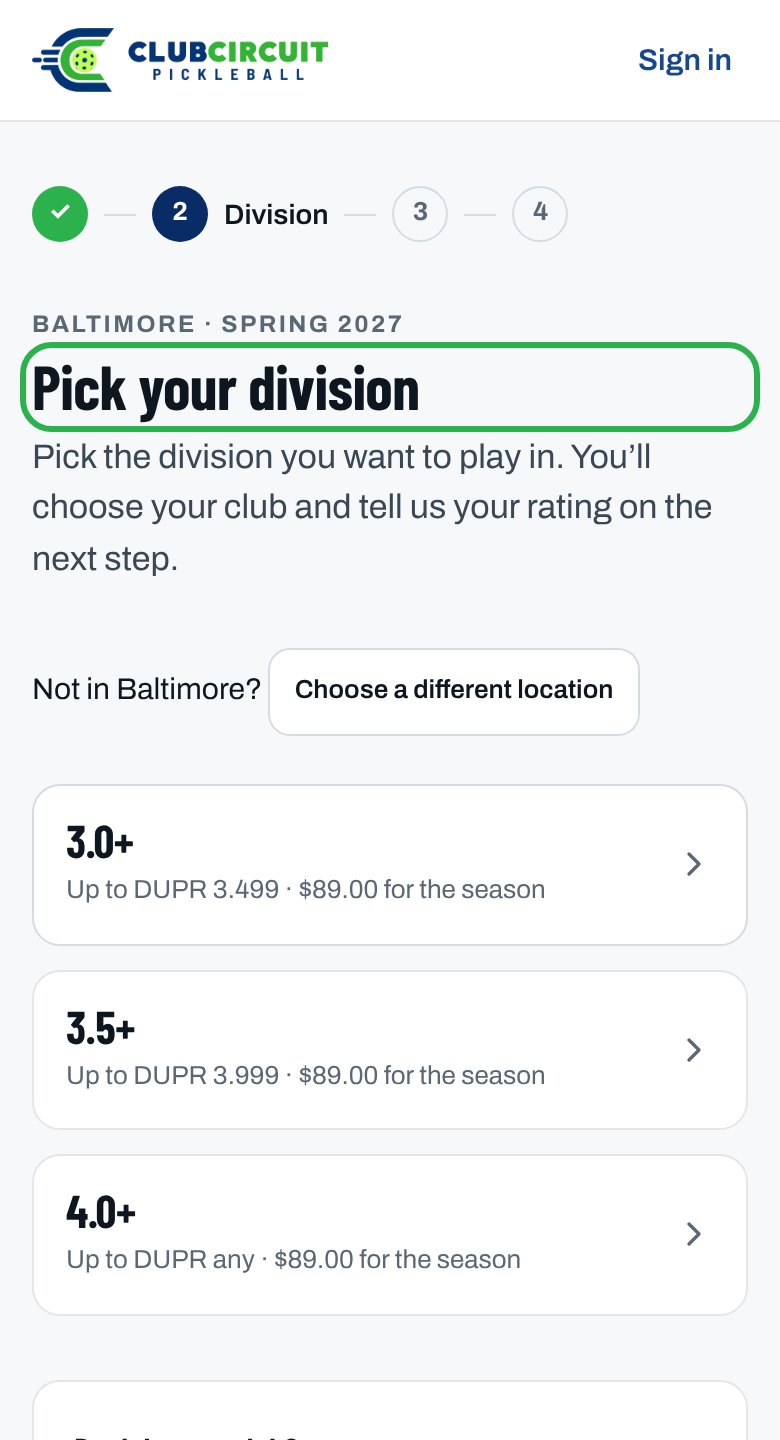
3
Choose your club
Pick it under Which club are you playing for? No club? Choose I don’t have a club — find me one.
4
Fill in your details
Name, Date of birth, gender, and your DUPR details if asked. Pick a Jersey size if your league offers jerseys.
5
Tick the agreements
Under Agreements, tick the Participation Waiver box, and the box for the Privacy Policy and Terms of Use & Participation.
6
Pay
Check Your price: and tap Continue to payment. If your club charges admissions and amusement tax, Your price: says so, and the payment page adds it as its own line. Tap Pay, then pay on Stripe’s secure page. Have a discount code? Tap Add promotion code there.
You see Payment received and your place is confirmed, then What happens next. We email you You’re in, with your receipt and the same next steps.
Not signed in? The button says Email me a code to finish. Type the 6-digit code from the email and carry on.
What you might see instead
“Payment received”, but not “confirmed”
“Payment received”, but not “confirmed”
The league office is checking your registration, usually your rating or a full division. There’s nothing more to pay. We email you when it’s decided.
“You’re in”: nothing to pay
“You’re in”: nothing to pay
Your fee was waived, you’re a captain, or a code covered it. The form shows Your price: $0.00 before you submit. The You’re in email comes straight away, with no receipt.
“You’re on the waitlist”
“You’re on the waitlist”
The division is full. We email you if a place opens, and you’re not charged unless one does.
I closed the payment page before paying
I closed the payment page before paying
Your place is held. On Home, tap the Pay button, which shows what you owe. Or tap Finish paying on Your account under Your seasons, or on the division on the registration page. We also email you one reminder the next day.
“… league office suggests moving your registration to …”
“… league office suggests moving your registration to …”
Your rating fits another division better. Tap Accept the move to move there, or Keep my registration as it is. Your payment stays as it is, and nothing changes unless you accept. The offer ends when registration closes or that division fills.
Related articles
Fix a registration problem
Every registration message, and what to do about it.
Register as a team captain
Most captains register free.
Sign in
Get your sign-in code.
Get ready while you wait
What to do before your club places you.