

- Only captains and club admins can open the directory.
- You can send a request only about a match your teams still have to play.
Send a request
1
Open the directory
Tap Captains directory under Captain in the sidebar, or in More on a phone. Or tap Your opponents’ captains on Manage team.
2
Find the captain
Under Matches you share, tap Contact. For anyone else, use Search captains by first or last name.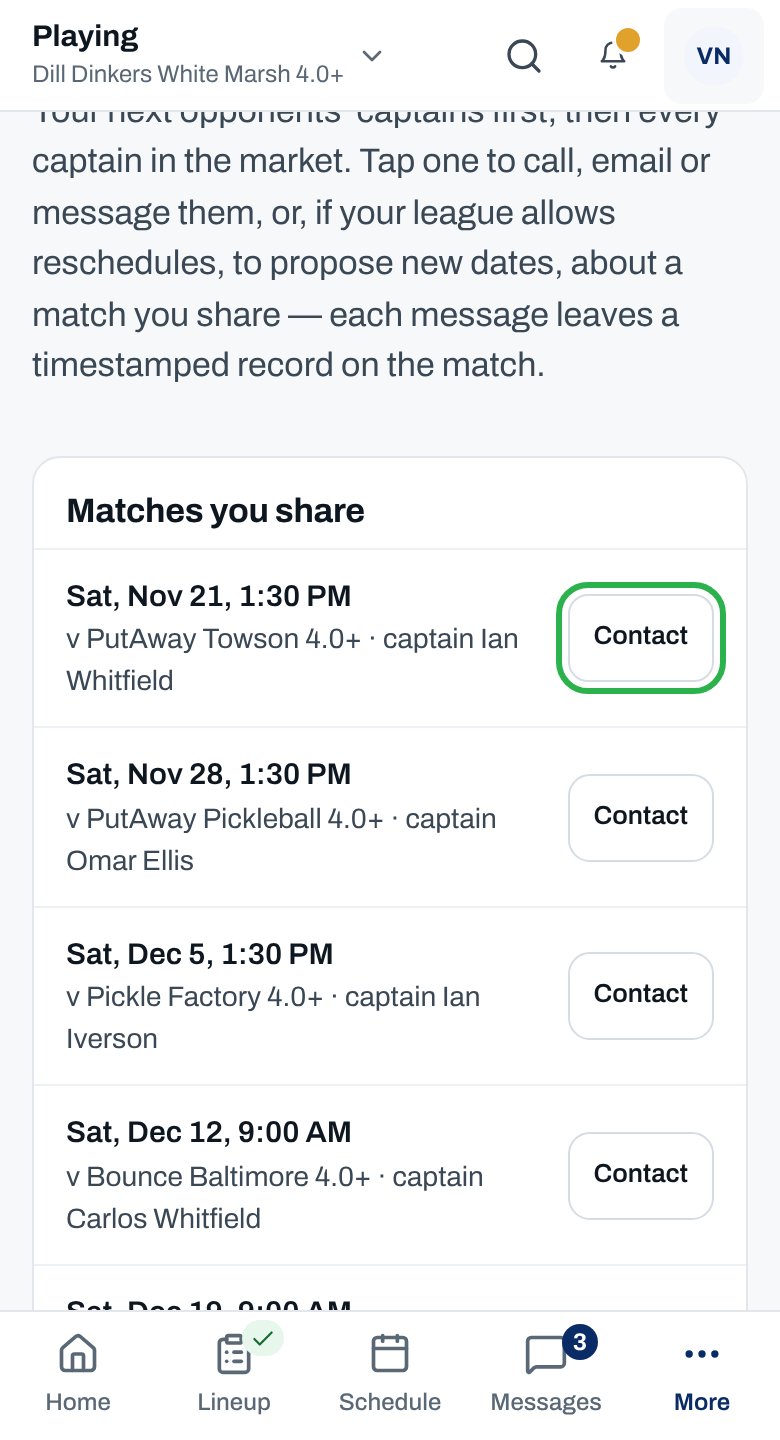
3
Pick a request
Notify of a lineup change, Request late-lineup consent, Propose reschedule dates or Flag a score discrepancy.
4
Add the details
Choose Which match if there’s more than one, then say what’s changing.
5
Tap Send
For a late-lineup request, it’s Request consent.
You see “Sent, and recorded on the match. The other captain has been notified.”
More ways to reach captains
Call or email a captain
Call or email a captain
Tap their name. Call shows if they shared their number. Email shows only to their own club’s admins.
Move a match
Move a match
Propose reschedule dates opens its own form. See Ask to reschedule a match.
Club HQ's directory
Club HQ's directory
Club admins open Captains directory under Talk in Club HQ. It works the same, with your club’s captains first.
Why isn’t this working?
“None of your teams plays theirs yet.”
“None of your teams plays theirs yet.”
Requests are about a match you share. You can’t send one until your teams are scheduled to play.
“No match left to play against them.”
“No match left to play against them.”
You’ve already played them this season. For anything else, ask the league office.
“You don’t captain a team in this market, so there’s nothing to send yet.”
“You don’t captain a team in this market, so there’s nothing to send yet.”
You’re a club admin but not a captain here. You can still call or email, where shown.
I can't open the Captains directory
I can't open the Captains directory
Just made captain? Sign out and back in. Still no? Ask your club’s admins to check you’re set as captain.
“No captain matches …”
“No captain matches …”
Check the spelling of their first or last name, or clear the search.
Related articles
Answer a captain's request
Grant, decline or acknowledge.
Reschedule a match
Offer other dates.
Manage your team
See who can play.
League rules
Late lineups and penalties.