

- Only a captain of the team that didn’t submit can confirm. If your co-captain submitted, the other team confirms.
- Have your paper scoresheet to hand, if you kept one.
Confirm the result
1
Open the scores
On Home, tap Review and confirm. On a phone, tap the row that starts Confirm the result. Or tap Confirm result in the Confirm the scores email.
2
Check every court
The Scores tab lists each round and court with the score entered.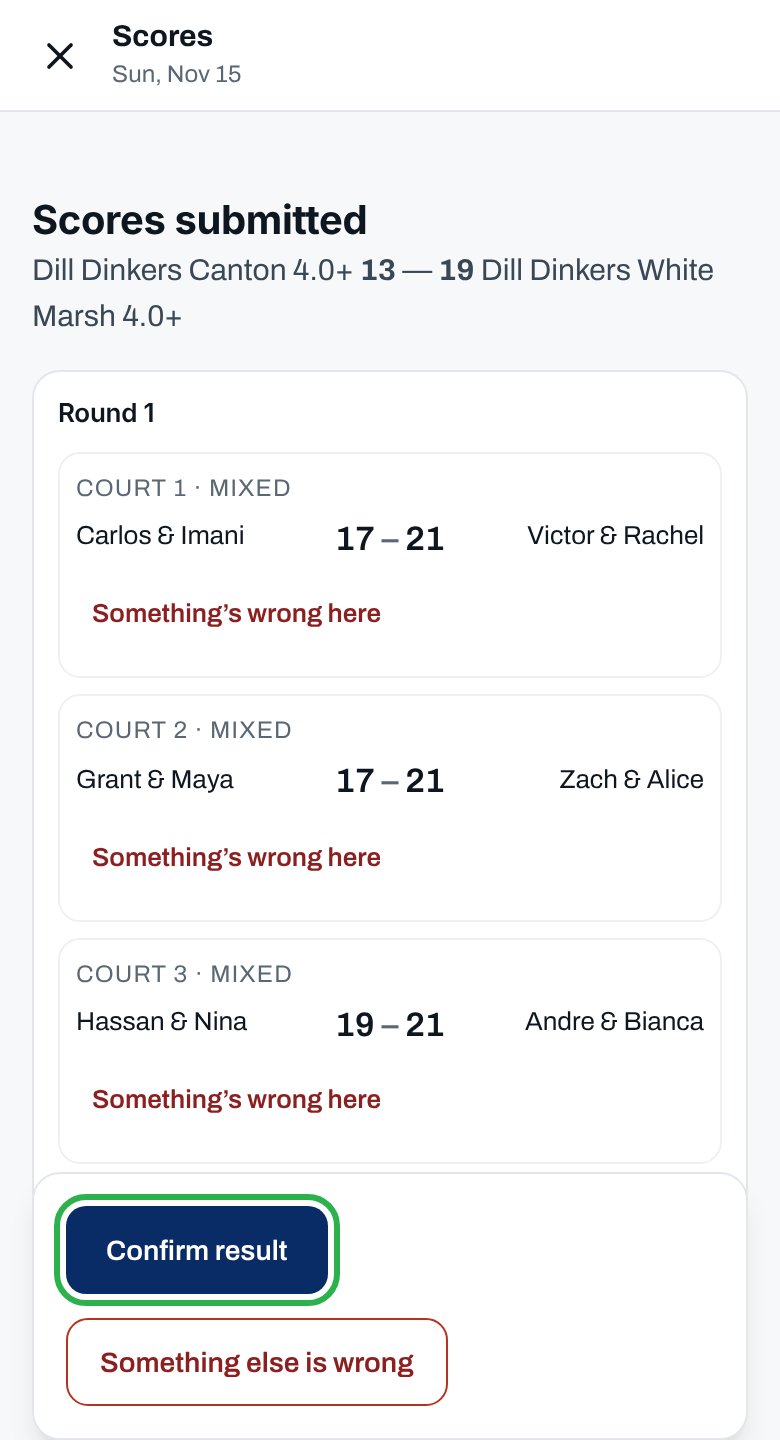
3
Flag a wrong court
Only if one is wrong: tap Something’s wrong here on it, and enter what it should be. The email’s Something’s wrong button opens the courts.
4
Confirm
Tap Confirm result. With a court flagged, it reads Confirm the rest, query 1 court.
You see Result confirmed. Standings updated. Both teams get the result. If you flagged a court, the other captain answers it, and the result counts as entered, marked Under review, until they do.
After you confirm
What if nobody confirms?
What if nobody confirms?
- Your league may confirm the result automatically after a set time. The Confirm the scores email says Answer by and when. After that, the scores count as entered.
- In a league that doesn’t, the email says the result doesn’t count until you answer.
Something other than a score is wrong
Something other than a score is wrong
Tap Something else is wrong instead of confirming. See Report a result to the league office.
The result changed after I confirmed
The result changed after I confirmed
The league office can apply a game penalty, for example for a late lineup, or rule on a dispute. The result and standings update, and both teams are told.
Why isn’t this working?
I see “Waiting for the other captain to confirm.” instead of Confirm result
I see “Waiting for the other captain to confirm.” instead of Confirm result
Your team submitted these scores, perhaps your co-captain did. Wait for the other team’s captain.
Confirm the rest is grayed out
Confirm the rest is grayed out
For each court you flagged, enter the score it should be and a short note. Changed your mind? Tap This score is right after all.
“… that’s the score already entered.”
“… that’s the score already entered.”
Enter the score the court should be, not the one it has.
“That didn’t save — check your signal and try again.”
“That didn’t save — check your signal and try again.”
Move somewhere with better signal and tap the button again.
Related articles
Query a wrong score
One court’s score is off.
Enter your match scores
When your team enters them.
See where your team stands
The standings after the result.
League rules
How scores and standings work.